Showing posts with label CCSS. Show all posts

Friday, November 15, 2013

10 minutes?

I am a teacher - I have been for the past 16  years.  I've been at the middle school level for 10 years and in a high school for 6 years.  During that time I have tried what is new, given old strategies a new try and I have learned what works and does not work in my classroom along the way! I started my career as a high school chemistry teacher - long before "Breaking Bad" gave chem teachers some 'street cred'...and during all this time I was never a proponent of giving students homework just to give them work to do at home.

When I started teaching I wasn't very good - I'll be honest.  I lectured 2-3 times a week and we did a lab on the block day.  I would give HW nearly every night because that is what the teachers I had in high school did and that is what the teachers around me were doing.  As time went on I started to think more about what I was doing and I started to become a better and more effective teacher.  I had students working fairly hard in my classroom and I started to see that they didn't really need to do any HW as long as they were working in class.  I also realized students in my classroom had more going on after school than I did 'back in the day'.  They were on travel club teams, took music lessons, had to babysit their siblings or just about anything else you can think of - kids today are busy!  Over time my philosophy about HW has changed.  I was able to watch Waiting for Superman and I made some changes in my classroom.  I gave little to no HW, but I expected students to work hard in class.

Last week while reading my Twitter feed I came across a tweet from @jcorippo - which was actually a retweet of @TDOttowa who had 'scooped' a blog from @pernilleripp (just another example of the power of Twitter).  If you don't understand the "@" or "retweet" or "scooped" that is all fine...that is just how I ended up reading this great blog "Why the Grade x 10 Minutes for Homework is a Fail".

While reading the blog I started thinking about my 6 year old daughter who is in 1st grade.  She is a great kid and seems to love school and learning.  When she was in preschool she would tell me the things she had learned that day and she was excited to share what she had heard in a book or from her teacher.  In Kindergarten her teacher was able to keep her enthusiasm to learn at a high level and she learned to read - giving her the ability to learn more things on her own.  Over the summer between Kinder and 1st she started saying things like "I'm going to have a lot of homework in 1st grade" and "I think 1st grade is going to be hard".

I knew that she was right and I said things like "you don't want everything to be easy, if it's always easy you aren't learning anything" and "that's ok, you are a hard worker and with hard work you'll be able to figure it out".  She is now 11 weeks in to 1st grade and I asked her what she thought about 1st grade so far.  Her answer surprised me. 

She said she liked school and she was having fun...but she also said she didn't like going to school any more and she wished it was summer already.  (From an 8th grader I would understand this...but not from a 1st grader)  I asked why she wished school was over and she said something like "I used to like to go to school because it was fun, but now there is too much homework".  Of course I tried to remind her that she was working hard and doing well and I told her that I thought she actually likes the HW.  She quickly told me "I used to like HW, but it is always the same thing over and over".  She followed that up by telling me "my HW is just doing what they did in class at home".  She is only 6 years old and she understands that HW is just a repeat of what she has done in the classroom.

She goes to a great school (971 API for those of you who understand that) and I know that her teacher is awesome and doing all she can to prepare her for 2nd grade and the impending Common Core State Standards that are just around the corner.  I have felt like she has a lot of HW so I sat down and took a look at what she was doing each week.  Here is what I found...

My daughter receives a homework packet every Monday that is due the next Monday.  It is fairly simple and I always think it won't take too long.  The packet includes the following:
  • Small amount of ELA for each day (3 mins per day)
  • Book report - one page that does not have too much writing (20 mins per week)
  • Oral report - reading something and then practicing (20 mins per week)
  • CCSS Math workbook pages (5 mins per day)
  • Spelling list - 10 words that are all super easy right now (2 mins per day)
  • Optional math work in the packet (3 mins per day)
  • Reading log (at least 10 mins per day - for 7 days)

I have seen many articles and blogs stating the typical amount of HW for students should be 10 mins per day per grade level - so 10 mins per day for a 1st grader (120 mins a day for a 12th grader).  My daughter's HW adds up to 155 mins per week or 22 mins per day - double what I expected.  I hadn't really thought about it too much...but when I add it up and see 155 min per week that seems like a lot.  And realize this does not include soccer practice, AWANA (church group for K-3), soccer games on Saturdays, church on Sundays and any other family time!  My wife and I have talked about getting her back in to swim lessons, maybe signing up for gymnastics and/or piano lessons - but I'm not sure the poor kid has any time left in her week (although we just decided she is going to play softball starting in January).

So what's my take away from all of this?  Like I said, I know that she is in a great school and I truly believe that her teacher is awesome and is doing what she needs to do in order to prepare her for what is next in a 1st grader's life.  So for this year I'll continue helping my daughter with her homework and encouraging her to do her best.  I want her to love learning - and I'll try to keep that as our focus.  Hopefully as she goes through the rest of her school years she will find a balance between learning and homework.  Hopefully more teachers will realize how busy kids are and keep them working hard in the classroom so that their time at home can be a time for family and extra curricular activities rather than worksheets and busy work.


Tuesday, November 5, 2013

Screencast-o-matic

You do great things in your classroom - and when you can't be there because you are sick, you have family obligations or you have to be out of the room because of a district wide training - you don't want your students to "lose" that day of instruction.  Why not create a screen cast and have the substitute teacher just play your video to the students?

Or maybe your students have created a great project and they want to share it with the rest of the class, school, district or world.  You could have them create a quick screen cast and upload it to your class webpage for everyone else to view!

I have done both of these things in my classroom.  I have tried different software and web 2.0 tools - but the one I found that works the best (for free) is screencast-o-matic!  This web 2.0 tool allows you to record your screen, voice and video from your webcam for up to 15 minutes for free.  When finished you have options of saving the video file to screencast-o-matic, YouTube or to your own computer.  

Here is a 9 minute tutorial on how to use screencast-o-matic:

A few other things:
  • You can create an account and login so that when you are done with your video you can save it right to their website.  This also allows you to store your screen casts all in one place.
  • Go Pro! - for $15 a year you can add many features to your account.  Highlights include no watermark, editing features, draw and zoom, screen shots and publishing to Google Drive.

Monday, October 21, 2013

Boom! and you're published

Did you ever take a road trip when you were a kid?  Our family drives from California to Colorado twice a year!  Yes, that is 14-16 hours in the car with a 4 and 6 year old.  That is a long time in the car!  And while watching movies helps keep them entertained,  as a parent I don't want them to sit in front of a screen for that long (even if it does keep them quiet).  So we come up with games to play in the car.  We do some of the classics like I spy, guess what animal I'm thinking of and finding the alphabet on road signs.  
These games are great time killers on a long road trip, they don't really stimulate imagination or creativity in my kids.  To try and get them using their imagination more we play the "add on to the story" game.  This is where one person starts a story and then another person picks up where the first left off and adds their own part of the story.  Then it moves to the next person and so on until the story ends.  It may start off with "Once upon a time there was a princess that lived in a castle... "and end with "...they lived happily ever after"  (I have two girls) - but the middle is up to them to imagine and create as we drive.

I thought this would be an awesome thing to do in the classroom if possible.  Well, while looking around online this weekend I found a tool that makes this happen!   Admittedly this tool is probably best for elementary school aged students - but I think with some good directions and a little planning it could be used in the upper grades.  The website is Boom Writer - or @BoomWriter_ on Twitter.  
The website has a great "how-to" graphic...but here is a quick explaination.  The teacher goes in and creates an account and then adds their students in their classes within the site (as a MS and HS teacher I would not want to input all of my students in the system...but a good TA could make it work!).  There are ways to have them enter themselves in the class also if you want to go that route also.

Next you select a book beginning.  You could write your own or select from one of the many they have available on the their site.  And here is where the fun begins!  You have students read the first chapter and they write the second chapter to the book.  But wait - you don't have time to read all of the students second chapter, select the best and then tell students who had the best and why.  So Boom Writer sets this up for you!  Students go on and read other students chapters and they vote for their favorite.  I would be worried students would just vote for their friends or the "A+" student in the class.  But Boom Writer keeps the authors anonymous so you don't have to worry about those problems :)  

Once the second chapter is selected you can continue in the same way...keep going until your book is complete.  So if a student's chapter was not selected this will motivate them to write again to hopefully be voted in for chapter 3.  This just seems like a great tool and I would love to see my 1st grader get involved with this in her class.

So what happens at the end?  Well, I'm not in love with the way it ends...but there are pros and cons I suppose.  Finished books are published!  The problem is that they cost $9.99.  I did not see anywhere on their website that you can get a free book - but I suppose they do need to make money.  Again, in an elementary classroom this could be a great opportunity to have parents buy the book for their child as a keepsake.  It would be nice if Boom Writer would give the teacher a free book if 20 books were purchased - but like I said, I did not see that as an option on their website.

So anyway, I thought this was a pretty cool tool and wanted to share it with you.  I can see it being very powerful in the lower grades...allowing for creativity and critical thinking (leaving the story open so it can continue).  In the upper grades I think you could create a story for each class.  And maybe you just have them write but they do not purchase the book in the end?  


The possibilities with this are endless.  I can see two or three classes at the same site (or even better in different cities, states, countries) all in the same "class" all trying to be voted as the best next chapter.  As a science teacher I could see some sort of sci-fi book with real science facts intertwined.  History teachers could re-write history and see what changes students would allow.  Elective classes and PE could start any story they wanted and easily have students writing in their classes also!  And I think ELA teachers could figure out how to use this without any problems!

So if you give it a try let me know how it goes!  I'd love to read your story :) 

Thursday, October 17, 2013

Share the White Board


When I first saw RealtimeBoard  I wasn't sure it was going to have a use in the classroom - it is more of a business tool.  But the more I thought about it...and then when I started playing with it - this tool is awesome!  We all have the little whiteboards in our classroom (some have even make their own with this DIY video and a trip to Home Depot) and many of us use and love them - they are a great resource.  But...how many whiteboard markers do you buy each  year and still hear "my marker doesn't work"?  And what is your breaking point with students drawing random pictures on the boards?  Well RealtimeBoard helps with these issues - and many more!


First of all the whiteboard has a lot of space - you can just expand it more and more...it seems like it goes on forever (well not forever...but check it out and  you'll see what I mean).  Also, you can add text, images, lines and arrows, URLs, video, files from your computer or Google Drive - just about anything.  I wanted to practice creating one...so here is my "Chemical Reactions" practice board:


As you can see, I have jpegs of my PPT slides, video from YouTube for different reactions and I have linked them together with the text boxes in the middle (one of the templates provided).  So now you're saying to yourself "big deal, I can do that with popplet or some other program".  Yeah, I know - and I said in the first paragraph that this is awesome...so I have to give you more reasons to use it right?

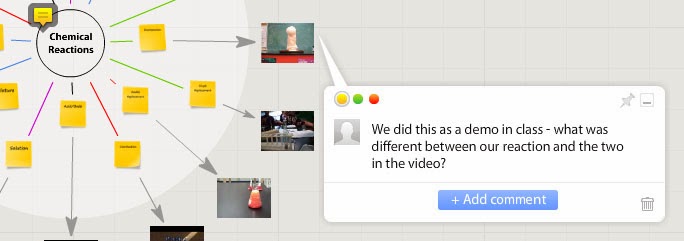
Well this little icon is a game changer.  You can leave little notes on different items for students to read - or to remind yourself of things (we are all getting older and more forgetful - post-its may be our future...time to get used to it).  But seriously, leaving notes for students to refer to is a very helpful feature of this web 2.0 based product.  You can remind them of where to find other resources, give them questions to answer, give more instruction or just let them know what you think about a video.

But wait...there's more!  You didn't think I was going to tell you that just leaving a note made this "awesome" did you?  Here is where it gets powerful - it can be shared like a Google Doc and students can collaborate on the whiteboard!  The image to the left is an example - I left a note to my students and they can also leave a comment back to me.  What's that?  Oh yeah...awesome right?  Let's see, we can check off Create, Collaborate, Communicate and we can get students thinking critically with the right assignment!  So yes - it fits right in with Common Core.  And you can share it with specific people via email or just have it open on the internet.  So here is a link to my practice board...check it out and leave me a message on the board!

How do you export is your next question...I know - it was mine too!  Check this out:
So you can export just about any way that you want!  You can also make multiple boards and put them together if you like.  The only thing missing seems to be a link to share it via Twitter :(

OK - here is the downfall of this tool.  You can sign up for a free account - but you only get 3 free boards. After that, if you want to upgrade it goes to $8.50 a month for unlimited boards.  I know, I know - I got you all worked up and ready to use this and then pulled the rug out from under your feet (or maybe I'll go with Lucy pulling the football away from Charlie Brown).  Sorry about that :(

Oh but wait...there is still more!!!  Since we are all educators (and I don't pay for many things for the classroom) - there is a way to get a free license.  If you click on the education link on their website you can input your school email and web address and they'll look in to giving you a free account...and the same for your students.  So like I said...this really is an awesome tool!


 So what are you waiting for?  Give it a try and let me know how you used it...and even better - let me know what your students thought of RealtimeBoard!


Monday, September 30, 2013

Get Creative

Have you always wanted to be on the front cover of a magazine?  Or maybe a movie poster was more your dream?  Or maybe you just want to have students create cool things to prove they have mastered a topic in your classroom?  If so, I found something you may be interested in!

I discovered a great - free - resource to create magazine covers, movie posters, mosaics or motivational posters (but wait...there's more!).  Honestly, this site has a lot to offer and it is all free!  The site is Big Huge Labs.  At first I thought this was just a "fun" little site...but then I started thinking about how it could be used in the classroom.  In history students can create movie posters about a time period or event.  In English they could create a magazine cover for the main character in a novel.  In science a mosaic of pictures from their lab would really show some creativity in their lab report.  And in math students could create motivational posters based on different rules like PEMDAS or reducing fractions.

As you can see - this site will  help students be creative...Yeah for Common Core!  The possibilities are endless really.  You all know what would work best in your classroom - I just thought I would share the site so that you can put your creativity to work!  And like most of us all know already...if  you put the tool  in the hands of the students they will do amazing things!

Here is a quick little practice magazine cover I created while practicing with the website:


One downside - there are a lot of ads on the site...they have to make money in some way.  You will need to teach students what are ads and what buttons they need to click to create their project.  But, there is a link at the top of the page for education where you can sign up for an educator's account so that you can:
  • Pre-register your students so they can sign in without requiring an email address.
  • View and download content created by your students.
  • Use the site advertising-free. And we absolutely do not try to sell anything to your students.
  • Ready to print ID cards for your students
Signing up for an educator's account is easy.  All you need to do is:
  1. Create a free account or sign in. (Registering with your school email address isn't required but it does speed up the approval process.)
  2. Return here to scan and upload proof of current educator status. This can be a scan of your official school identification or similar document.
Anyway, check it out and give it a try.  I created the sample above without adding my email or creating an account.  If you do end up using it - respond and tell me what you did and if the students enjoyed it!

Friday, September 27, 2013

Wait...What?!


Remember - I am not an ELA teacher, I am a science teacher who loves technology.  So I found this cool new tool and I wanted to share it.

I stumbled upon this website that I think teachers could easily use in their classroom.  This could be used in any subject area - but I think it would be best in ELA, History and Science.  Sorry math folks, I don't think this one would be that helpful for you.

The tool is call Rewordify - and it will take a text and quickly define words that are difficult.  I tested the site with the poem "I Wandered Lonely as a Cloud" by William Wordsworth.  The poem was written back in the early 1800's and most students probably would not relate to the poem as it is written. Rewordify highlights in yellow the more common word and (with a few changes to the default settings) will also highlight in purple the word it is defining. Here is what I found when I copied/pasted the poem on their site:


I know the actual words make the poem much more descriptive and it reads better with the original text.  I also know that with Common Core just around the corner we need to be teaching academic vocabulary and having students understand what these words mean.  But with this tool a student can better understand the meaning of the text.  I am guessing that many of our students may not know the word "pensive" or "sprightly" and I know they would not know the word "jocund" - but this tool gives students a quick replacement to help them  understand the meaning.

Also...the site quickly will give you a data table (there is the science teacher in me) that looks like this:
I do not know if the reading level is accurate or not - but it tells you what it thinks...based on the total number of words vs the number of words it has to define.

Anyway - it is simple to use, free and it might help your students with some of their assignments.  So give it a try and pass it along to other teachers, students, admin and parents!