
When I first saw RealtimeBoard I wasn't sure it was going to have a use in the classroom - it is more of a business tool. But the more I thought about it...and then when I started playing with it - this tool is awesome! We all have the little whiteboards in our classroom (some have even make their own with this DIY video and a trip to Home Depot) and many of us use and love them - they are a great resource. But...how many whiteboard markers do you buy each year and still hear "my marker doesn't work"? And what is your breaking point with students drawing random pictures on the boards? Well RealtimeBoard helps with these issues - and many more!
First of all the whiteboard has a lot of space - you can just expand it more and more...it seems like it goes on forever (well not forever...but check it out and you'll see what I mean). Also, you can add text, images, lines and arrows, URLs, video, files from your computer or Google Drive - just about anything. I wanted to practice creating one...so here is my "Chemical Reactions" practice board:

As you can see, I have jpegs of my PPT slides, video from YouTube for different reactions and I have linked them together with the text boxes in the middle (one of the templates provided). So now you're saying to yourself "big deal, I can do that with popplet or some other program". Yeah, I know - and I said in the first paragraph that this is awesome...so I have to give you more reasons to use it right?
 Well this little icon is a game changer. You can leave little notes on different items for students to read - or to remind yourself of things (we are all getting older and more forgetful - post-its may be our future...time to get used to it). But seriously, leaving notes for students to refer to is a very helpful feature of this web 2.0 based product. You can remind them of where to find other resources, give them questions to answer, give more instruction or just let them know what you think about a video.
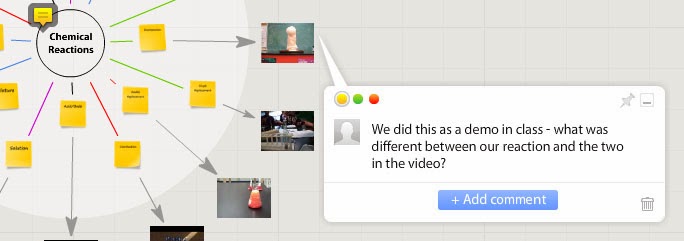 But wait...there's more! You didn't think I was going to tell you that just leaving a note made this "awesome" did you? Here is where it gets powerful - it can be shared like a Google Doc and students can collaborate on the whiteboard! The image to the left is an example - I left a note to my students and they can also leave a comment back to me. What's that? Oh yeah...awesome right? Let's see, we can check off Create, Collaborate, Communicate and we can get students thinking critically with the right assignment! So yes - it fits right in with Common Core. And you can share it with specific people via email or just have it open on the internet. So here is a link to my practice board...check it out and leave me a message on the board!
How do you export is your next question...I know - it was mine too! Check this out:

So you can export just about any way that you want! You can also make multiple boards and put them together if you like. The only thing missing seems to be a link to share it via Twitter :(
OK - here is the downfall of this tool. You can sign up for a free account - but you only get 3 free boards. After that, if you want to upgrade it goes to $8.50 a month for unlimited boards. I know, I know - I got you all worked up and ready to use this and then pulled the rug out from under your feet (or maybe I'll go with Lucy pulling the football away from Charlie Brown). Sorry about that :(
Oh but wait...there is still more!!! Since we are all educators (and I don't pay for many things for the classroom) - there is a way to get a free license. If you click on the education link on their website you can input your school email and web address and they'll look in to giving you a free account...and the same for your students. So like I said...this really is an awesome tool!

So what are you waiting for? Give it a try and let me know how you used it...and even better - let me know what your students thought of RealtimeBoard!


